Thursday, September 11, 2014

Multiplayer Level Proposal

For my Game Design class we are greyboxing a multiplayer map that will be used in a team deathmatch game. The idea I had was to create a level in an abandoned baseball stadium/ car graveyard. The reason I chose this locale was because I have never seen anything like it in any of the multiplayer games I have played and thought it could be a interesting twist.

The basic story within this environment is this structure has been decaying over the years and rather then demolishing it, an organization decided to use it as a place to store cars/junk.


Sunday, September 7, 2014

Multiplayer Level Analysis

For class we were asked to analyze a multi-player first person shooter level. The game I chose is Star Wars Battlefront II. Technically the game is a third person shooter but it does have a first person mode. Despite being a FPS or TPS, the games multi-player level design is fun and well constructed.


Game Overview:

In Star Wars Battlefront II two factions fight head to to head in a conquest style combat. Both sides start with a set amount of reinforcements and once that number reaches zero, the team with the higher reinforcement count wins the game. The major mechanic in Star Wars Battlefront II is capturing of command points, or CPs. Taking control of CPs causes your enemies reinforcements to decline at a faster then normal rate.


Setting/Environment:

The level takes place in Mos Eisley, a city on the planet of Tatooine. The map takes place during the day and the sandy desolate environment is clearly visible to the player. The reason I chose this level is because its very nonlinear in the way the player can traverse the map. The player has ample opportunity to use buildings as cover and a vantage points.

Sections:

The two major areas of the level are the Spaceport and the Cantina. These two landmarks are clearly visible and controlling either one of them could be the deciding factor for a victory. The spaceport is a large structure that is defended by player/npc controller turrets. The central location of the spaceport on the map allows for reinforcements to flank enemies from all sides.

Game play:

Scatted throughout the level are buildings that can be used for cover. Some of the buildings have attached stairs that give the player access to height advantages. Some of the buildings even have turrets on the roof. This adds even more interest and offers some unique choke points on the map.


Monday, August 25, 2014

Platformer Level Layout

For my Game Design class we were tasked with creating a level layout for a possible Platformer tutorial level. I thought it would be fun to reuse some of the assets I made over the summer for my Bazaar.

What is the conflict?
 The player has very little money and has had to steal to basically get by day to day. Today is the day they get caught. The player must navigate the streets of the bazaar and avoid the guards looking to take them to jail.

Where is it?
 On the streets of a bazaar.

What time of the year is is?
Late summer.

What time of the day is is?
Midday.

Who else lives here?
Merchants, Beggars, Guards

What does the architecture look like?
Middle Eastern / Moroccan /Arabian  

What happened to the environment prior to the player getting there?
Merchants opened shop for the day to sell their goods.

How did the player arrive in this environment? What brought them here?
The player walked into the bazaar via a street entrance. They are here to steal goods such as fruit/clothing/etc.


Tuesday, August 19, 2014

2D Platformer Analysis

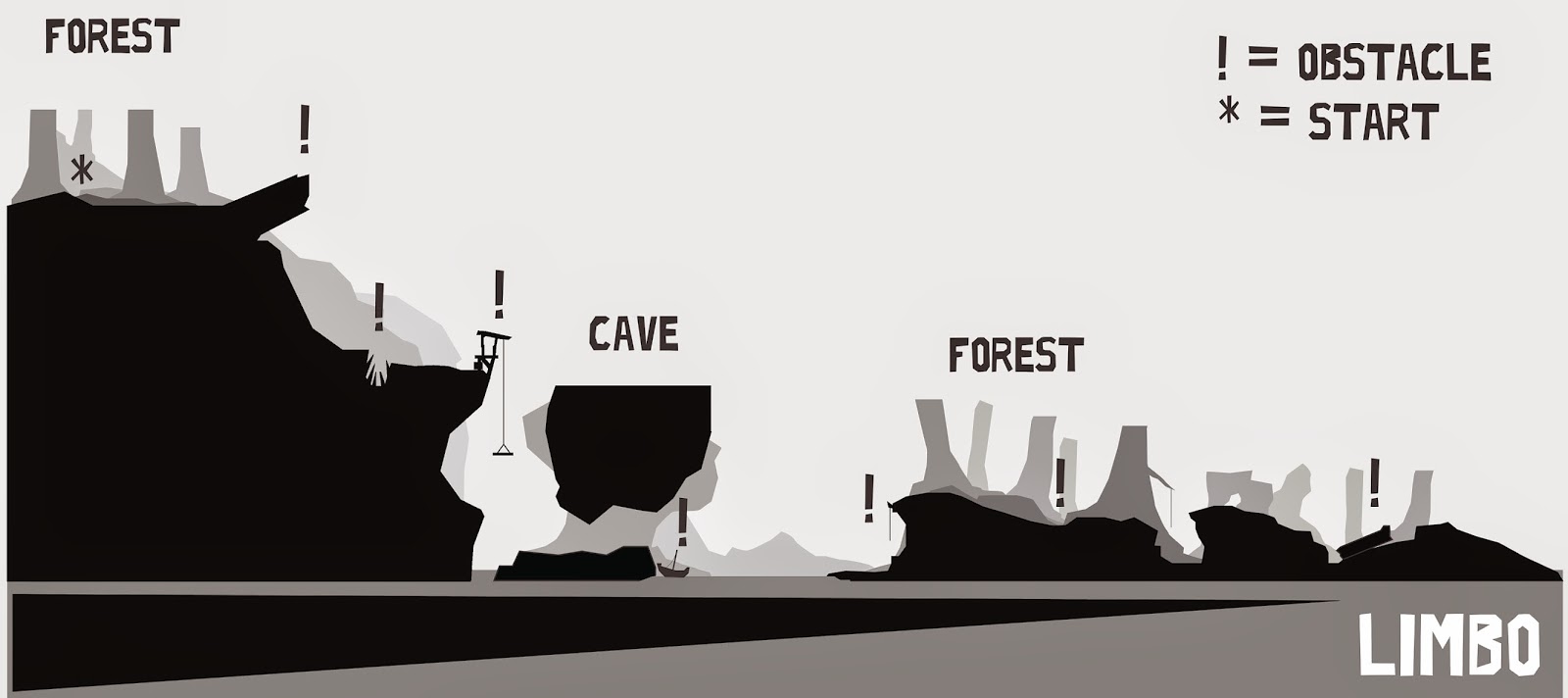
 For my Game Design class we were tasked with analyzing a sidescrolling platforming game. The game I chose is LIMBO, a stylized puzzle platformer developed by Playdead.


The basic story of the LIMBO is that you play as a boy that awakens in a dark forest at the edge of hell. You must journey through this world and solve puzzles and try to survive.


The game is interesting because it's essentially one giant level that seamlessly blends into each other. This was particularly difficult when trying to analyze the games "tutorial" level. However, the first few minutes of gameplay are paced in a way that gives the player a chance at learning the mechanics, even if its very unforgiving and you will probably die..

In LIMBO you learn by doing. All of the puzzles/obstacles can somehow kill you. The game isn't too hard but it is very easy to die and you will have plenty of opportunity to learn from those mistakes.

The obstacles in LIMBO include such things as pull carts, rope swinging, dodging boulders, as well as many others.


As the game progresses players are introduced to increasingly difficult puzzles and enemy creatures that offer a more immediate threat than the environment itself.


Here is the level layout and he first few minutes of gameplay.


Wednesday, August 13, 2014

Summer Unreal 4 Environment: Bazaar

Over these past few weeks ive been teaming with friend and fellow GAD, Sarah Reynolds, on a joint environment project. Here work can be found at http://www.sarahlynnreynolds.com/. Our theme was a Bazaar of some sort. We both shared in modelling the assets in the environment. The piece is still in the work in progress stages but is extremely close to being finished.

Here is the most finalized image I have of the scene.

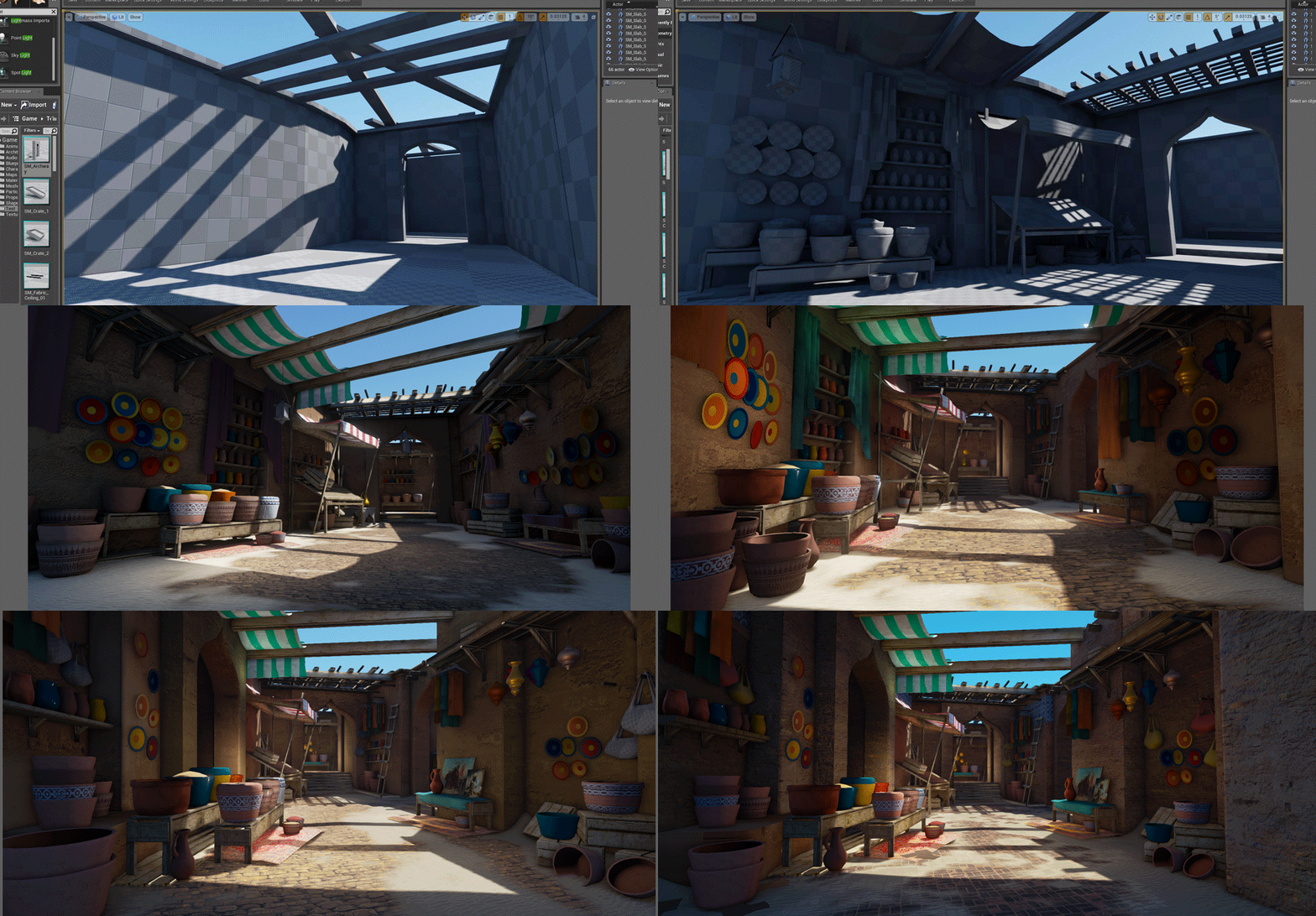
 Here is my changes throughout the process of creating the scene.


Here is a look at the individual shots from my process.


 This was my initial block out of the scene.

Here was my first pass at set dressing the scene and trying to figure out a way to tackle the ceiling structure.
 

I wasn't happy with how the ceiling was looking so I decided to remove all of the clutter and give it another try.

Here I added some overhanging cloth to give the scene a little more interest.

First color and texture pass.

Decided to up the saturation of the walls and ground stone.

First lighting pass. Basically this is where I started to try and light the scene. I changed the overall dominant directional light to bring some more sunlight into the space. I also added some bounce light from the overhanging cloth.

Point light pass. I felt the scene needed a bit more light so I started to place more lights in the scene to capture the brightness. This was also the moment when I decided to open the space up more. The hallway arch on the left was added to add some depth.

I added a few more props to the scene and amped up the saturation levels a tad. 


I decided to try and give a little separation by changing the colors of the walls and having them be different from one another. In this case a yellow wall and a orange wall.


From here I felt the space needed even more breakup so I decided to completely revamp most of the right side of the scene.

Changed the floor texture to something with a bit more interest.

Added a more realistic look to the sand on the ground.

Final saturation post process adjustment.

Monday, April 21, 2014

Programming: Script Ideas

For class we we're learning MEL/Python and were asked to make a post about 10 scripts that we might possibly want to create in the future. Here are my 10:

1.    Freeze transforms, deletes history, centers pivot, moves to center of world and exports as FBX
2.    Assigns new lambert and applies a new checker texture to the selected mesh
3.    Selects objects in scene and assigns random wireframe colors to them
4.    Assigns new lambert to selected mesh with randomized color
5.    Creates a second UV set for a bulk of selected objects
6.    Initial setup Maya settings script for working in UDK based on course site:
          a.    Border Edges/ Width          b.    Undo Queue to Infinite
          c.    Z Axis up
          d.    Near Clip on all cameras to 1 Far Clip on all cameras to 100000
          e.    Changes grid size
                    i.    Length and Width = 512
                    ii.    Gridlines = 16
                    iii.    Subdivisions = 1
7.    Toggles the Polygon Display > Normals for all the objects in the scene
8.    Toggles between Textured and Silhouette Mode (Black Lambert)
9.    Assigns a mental ray material to selected objects with 90% matte blend (for paint overs)
10.  Renders the objects in view-port using custom settings for mental ray (for paint overs)
          a. HD 1080 aspect ratio
          b. Production quality preset
          c. Creates a physical sun and sky node


Monday, April 14, 2014

Research: Racing Game Trailer

For my game design class we were asked to look up a trailer for a racing game to use as reference for our own personal racing level trailer. The game I chose was Gran Turismo 6. Here is the trailer:


The second trailer is Need For Speed Hot Pursuit.